Site Admins can schedule a recurring import of users from their own SFTP servers. Only users can be imported or updated.
Note
Classes, sections and other data can only be synced through Clever or Classlink.
Set up a recurring user import
- Log in with your Site Admin account.
- Click your profile icon at the top-right corner.
- From the drop-down menu, click Admin.
- Select the User Jobs tab in the Site Admin page.
- In the Recurring user import section, click the Create import button.
- Enter the required information for scheduled imports:
- SFTP host (host.example.com)
- Port
- Username (sftp_user)
- Password (password)
- Directory (~/)
- Click Create to confirm the settings and schedule your import.
Frequently Asked Questions
When does the import run?
The import frequency is set to occur nightly at 11 pm EST.
What files can the customer SFTP host?
- The customer SFTP server may host two files on their SFTP server directory: staff.csv and students.csv.
- No errors will be raised or reported if either or both files are not present.
- The CSVs are imported / updated through the same import available on the site. Any success or error messages are reflected in the IL Classroom application.
How should we remove student or staff accounts?
- Student and staff accounts need to be archived or deleted directly in the IL Classroom platform.
- The scheduled SFTP import will not detect accounts to be removed from the roster.
- If student username or staff email records are updated in the CSV files, those records will be uploaded to IL Classroom as new students or staff. IL Classroom will not recognize those users as pre-existing users.
Do user passwords update when the user is included in the recurring SFTP upload?
- Teacher passwords will not be updated via SFTP, but student passwords will be overwritten.
- If the district doesn't want the student passwords overwritten, they should remove those students from the uploads moving forward.
Is there a template I should use when creating my student or staff import files?
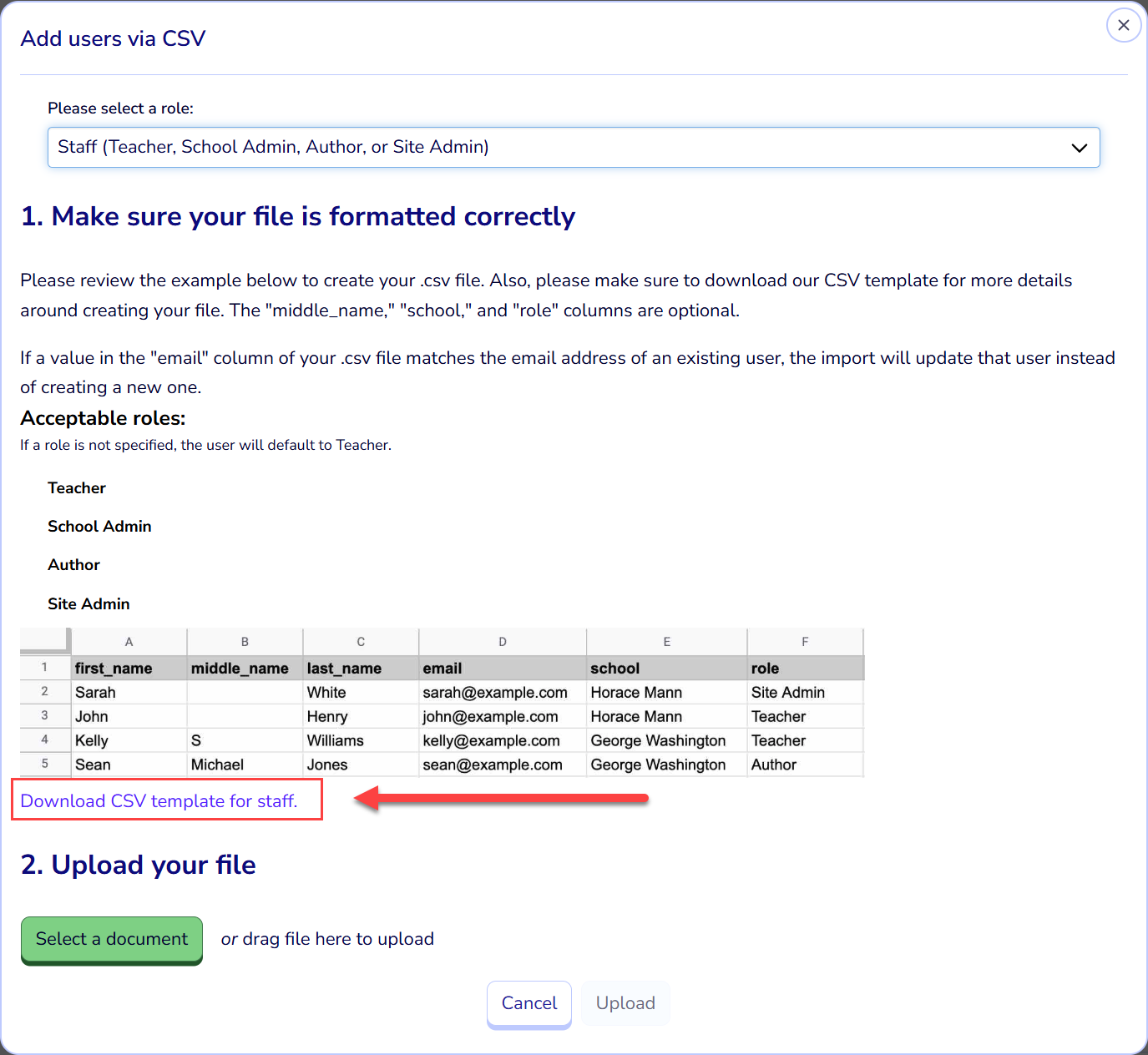
Templates can be found on the Users tab of Site Administration. Once there, click the option to Import users from a CSV file. Select the role of user for recurring import, student or staff, and locate the hyperlinked CSV template within that popup.
What is SFTP?
SFTP (SSH File Transfer Protocol), also known as Secure File Transfer Protocol, is a network protocol that provides secure file access, transfer, and management over any reliable data stream. Key characteristics of SFTP include:
- Security: It encrypts both command and data channels using algorithms like AES and Triple DES, ensuring data confidentiality and integrity during transit.
- Functionality: Unlike basic SCP, SFTP supports advanced features such as resuming interrupted transfers, directory listings, remote file removal, and symbolic link support.
- Port: It typically operates over port 22/TCP, allowing it to traverse firewalls more easily than FTPS, which requires multiple ports.
- Authentication: It leverages SSH authentication methods, supporting both password-based and SSH key-based access.
- Usage: It is widely used in enterprise environments for secure data exchange and is supported by various clients like WinSCP and the command-line sftp utility in OpenSSH.